
GitOps is the practice of using Git as the single source of truth (SSOT) for infrastructure configuration. In this guide, we explore how to use Git to store and manage your server configuration in a simple way, so you can track changes, simplify deployments and ensure consistency throughout your infrastructure. You'll also discover the tools and best practices that make GitOps possible, providing a clear audit trail and making deployments faster and easier to manage.

Introduction to GitOps
GitOps is a methodology and set of tools that help organizations make Git their single source of truth for production infrastructure. The goal is to provide secure and reliable access control, automated deployment, observability, compliance tracking and auditing capabilities, all through simple declarative policies stored in Git repositories.
GitOps favours people over machines (unlike traditional DevOps), open-source tools over proprietary solutions (unlike conventional Cloud Native), and trust over control (unlike rigid security approaches). The end result is an environment where everyone can see what's happening, enabling better collaboration between teams.
This approach is at the heart of what we offer at Hidora through our DevOps consulting services. Setting up a solid GitOps workflow is one of the first improvement levers we recommend to our clients.
Infrastructure as Code (IaC)
Infrastructure construction and provisioning are areas where Infrastructure as Code (IaC) truly shines. The reasons are twofold: manually typing all the configuration is tedious, and it increases the risk of introducing inadvertent errors.
Git is a version control system (VCS) created by Linus Torvalds as a replacement for BitKeeper. Unlike centralized VCS systems such as Subversion, Git (like Mercurial) is distributed and works by tracking every change made in its repository since its creation. This makes it particularly effective for managing large projects with many contributors over long periods, exactly what we need in our IaC toolkit.
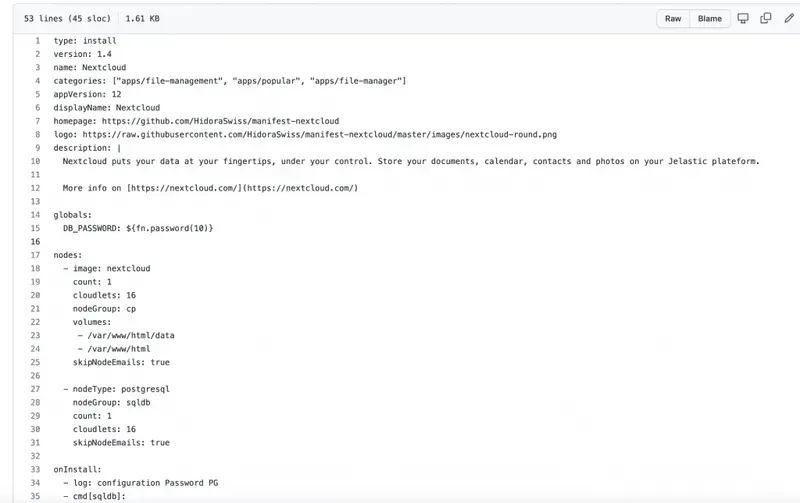
With tools like chef-solo, Ansible and SaltStack, you can declaratively specify the appearance of an environment via a collection of files tracked by your repository. The actual execution only happens when you want to update your target environment with the changes from your repository. This method encourages you to be explicit about how you want things configured. There's no misunderstanding when things go wrong or when another team member has slightly different expectations.
Testing Infrastructure as Code
Infrastructure as Code is great, but it only works if your development team actually uses it. You need monitoring mechanisms in place, whether through pull requests or code reviews.
When changes are made manually, it's difficult to know what changed and when. This makes it extremely challenging to determine which version is causing a failure, making troubleshooting and patching more complicated than necessary.
The solution is straightforward: use open-source continuous integration software (such as GitLab) and create tests for every IaC change. For example, if you're using Jelastic CloudScripting to deploy new stacks, test your changes before committing them by updating a pre-existing (pre-prod) stack instead of creating a new one. This lets you validate your modifications in a controlled environment before applying them to production.
In practice, effective IaC testing goes beyond a simple syntax check. Consider implementing a layered testing strategy. First, use linting tools like ansible-lint or tflint to catch syntax errors and style violations before a commit even reaches the CI pipeline. Second, run unit tests with tools like Terratest or Molecule that validate individual modules in isolation. Third, execute integration tests that provision a temporary environment, run smoke tests against it and tear it down automatically. This layered approach catches different categories of errors at different stages, reducing the feedback loop and preventing costly mistakes from reaching production.
The compliance advantage of Git-managed configuration
For Swiss companies operating under regulatory frameworks like nLPD, FINMA or ISO 27001, Git-managed infrastructure configuration provides a built-in compliance mechanism that manual processes cannot match.
Every change to infrastructure is recorded with a timestamp, an author, a description of the change and a link to the review that approved it. This creates a complete, immutable audit trail that satisfies the "who changed what, when and why" question that auditors invariably ask. When your compliance officer needs to demonstrate that a security patch was applied within 48 hours of disclosure, the Git log provides irrefutable evidence.
Pull request workflows add another layer of governance. You can require that every infrastructure change receives approval from at least two reviewers, including one from the security team, before it is merged. Branch protection rules enforce this policy automatically, removing the risk of human error or shortcuts under pressure.
This level of traceability is particularly valuable during incident response. When a production issue occurs at 2 AM, the on-call engineer can examine the Git history to identify exactly which configuration change introduced the problem, revert it with a single command and restore service within minutes. Without Git, this process typically involves hours of investigation across multiple systems and team members.
What does this have to do with Git?
Git, specifically the git repository management tools, is typically used to track code changes. Git's powerful branching capabilities and distributed architecture make it easy to manage multiple branches of code.
If you apply these same concepts and methods to non-code resources, such as infrastructure configuration files and remote task execution scripts, you can create a single source of truth that enables automation.
Imagine thousands of servers being automatically updated with new configurations at 1 AM every Sunday, or every time a commit is pushed to master on your GitHub project. The benefits are numerous: faster deployment times and fewer human errors, to name just two.
This is exactly the kind of automation we set up for our clients at Hidora, as part of our managed services. Every environment is versioned, every change is traceable.
Branch management
Branching is a major asset. It allows you to work on multiple features and changes simultaneously, then merge them when you're ready.
Here's a concrete example. You're working on improving your site's performance. You want to modify some CSS styles in addition to making changes to your server configuration. You can make these CSS changes on their own branch (for example, /css-perf) and push it to GitHub or GitLab with git push origin /css-perf. You can then make your server changes without worrying about breaking the CSS modifications.
Branches are fantastic. However, there's one important point to keep in mind: branches can make tracking history very difficult. That's why a good branching strategy (like GitFlow or trunk-based development) is essential for maintaining clarity in your configuration history.
Common pitfalls when adopting GitOps
Even with the right tools and intentions, teams frequently stumble during GitOps adoption. Recognizing these pitfalls early saves weeks of frustration and rework.
Configuration drift left unchecked. The most common failure mode is allowing manual changes to coexist alongside Git-managed configuration. An engineer SSH-ing into a production server to apply a quick fix creates drift between the declared state in Git and the actual state of the infrastructure. Over time, these ad-hoc changes accumulate and the Git repository no longer reflects reality. The fix is cultural as much as technical: enforce a strict policy that production changes only happen through Git, and use drift detection tools to alert when discrepancies appear.
Monolithic repositories that become unmanageable. Storing all infrastructure configuration in a single repository seems logical at first, but as the organization grows, it creates bottlenecks. Merge conflicts multiply, CI pipelines slow down, and teams block each other. A practical approach is to split configuration into domain-specific repositories (networking, application stacks, security policies) while maintaining a clear dependency map between them.
Ignoring the learning curve. GitOps requires that every team member understands Git workflows, declarative configuration and the reconciliation model. Assuming this knowledge exists without investing in training leads to workarounds and shadow processes that undermine the entire approach.
GitOps tooling: ArgoCD and Flux
The GitOps methodology is only as effective as the tools that implement it. Two open-source projects have emerged as the industry standard for Kubernetes-native GitOps: ArgoCD and Flux.
ArgoCD provides a declarative, GitOps-based continuous delivery tool for Kubernetes. It continuously monitors your Git repository and compares the desired state (defined in Git) against the actual state of your cluster. When drift is detected, ArgoCD can either alert you or automatically reconcile the difference. Its web-based dashboard gives teams a visual overview of application health and sync status, which is particularly useful for organizations managing dozens of microservices.
Flux takes a slightly different approach. It operates as a set of Kubernetes controllers that watch Git repositories and automatically apply changes. Flux is lighter weight than ArgoCD and integrates natively with Helm charts and Kustomize overlays. For teams that prefer a CLI-first workflow over graphical interfaces, Flux is often the better fit.
Both tools solve the same fundamental problem: ensuring that what is defined in Git is exactly what runs in production. At Hidora, we help clients choose between these tools based on their team size, existing workflows and operational preferences.
Best practices for adopting GitOps
To get the most out of GitOps, here are some recommendations based on our experience:
- Version everything. Not just application code, but also server configurations, deployment scripts, security policies and infrastructure definitions.
- Automate deployments. Use CI/CD pipelines that trigger automatically on every validated change to the main branch.
- Protect the main branch. Require code reviews and automated tests before any merge to master or main.
- Document changes. Every commit should explain why a change was made, not just what changed.
- Audit regularly. Periodically verify that the actual state of your infrastructure matches what's described in Git.
- Separate application and infrastructure repositories. Keeping application code and infrastructure definitions in separate repositories reduces deployment coupling and allows each to evolve at its own pace.
- Use secrets management tools. Never store sensitive values (passwords, API keys, certificates) directly in Git. Use tools like Sealed Secrets, SOPS or HashiCorp Vault to encrypt secrets before committing them.
GitOps is not a destination, it's a journey. Every organization can adopt it progressively, starting with the most critical elements of their infrastructure. The key is to start and iterate.

Cloud Product Manager
Cloud Product Manager at Hidora. Specialist in Kubernetes, IaC and observability.